Zerone Laboratories / operating systems
ztOS
A phone operating system with Windows Phone 8.1's look and motion, on Arch Linux ARM and mainline Linux.
ztOS is the ztMETRO shell, its own apps, an updater and an SDK for apps, on an ordinary Arch Linux ARM system. It runs on the phones in the device list and in the QEMU emulator. Everything that moves is drawn by the GPU.
It is beta software. Since BETA-1 ztOS is a generic system image (GSI) plus a small layer per phone, the two meeting at ztOSIAL (Zerone Technologies Operating System Interface Abstraction Layer), its hardware interface layer. The S9 port runs a mainline 7.1 kernel with the phone's GPU, display, touch, Wi-Fi, 4G data, sound and sensors working. ztConflo, its image builder, is how it reaches other phones.
Installing
From nothing to ztOS, in the emulator or on a phone.
There are three ways in. Pick one, then follow its steps from the top: each step says what to type, what you'll see, and how long it takes.
Get the computer ready
Every way starts here. You need a Linux computer, x86-64 or ARM, with about 15 GB free and an internet connection: the build downloads Arch Linux ARM and about 2 GB of packages. It never asks for sudo; only installing the tools below does.
- Install the toolsOn Arch Linux (tested):
sudo pacman -S --needed git util-linux libarchive dosfstools mtools e2fsprogs qemu-user-static qemu-user-static-binfmt qemu-system-aarch64 edk2-aarch64 qemu-hw-display-virtio-gpu-pci qemu-ui-gtk android-tools socat
On Debian or Ubuntu (not yet tested), the same tools are:sudo apt install git uidmap libarchive-tools dosfstools mtools e2fsprogs qemu-user-static binfmt-support qemu-system-arm qemu-efi-aarch64 adb socat - Give your account a range of user IDsThe build runs as you, in a user namespace.
grep $USER /etc/subuidshould print a line. If it prints nothing:sudo usermod --add-subuids 100000-165535 --add-subgids 100000-165535 $USER, then log out and back in. - Get ztOS
git clone https://github.com/Zerone-Laboratories/ztOS.gitcd ztOS
For a phone whose entry says so, alsogit submodule update --init(the phone's kernel tree). - Check
installer/ztos doctorshould say this computer can build ztOS, and list what the emulator and phones over USB still need. Fix anything it names before going on.
Try it in the emulator
- Build it
installer/ztos install --target qemu --mode build-install
It asks for a user name, a password (for logging in andsudo), a name for the phone and your time zone, then Start?: answer yes. - Wait30 to 60 minutes the first time: ARM programs run emulated. Later builds reuse what was downloaded;
--freshstarts again from scratch. If the network drops, run the same command again. - Start itAnswer yes to Start it now?. A phone-shaped window opens (540×1110) and ztOS starts in about a minute.
- Use itThe mouse is your finger: click to tap, drag to swipe, hold to hold. Escape is the back button, and the computer's keyboard types.
ssh -p 2222 <user>@localhostgets a shell. - Next time
installer/ztos emulatorstarts it again.--gldraws with your computer's GPU (faster; some NVIDIA laptops refuse it), and--headlessruns it without a window, on VNC at127.0.0.1:5905.
The emulator has no modem, sensors or battery, so those parts of ztOS stay off there.
Install it on a listed phone
- Open your phone's entryFind it on devices.ztos.online and check the model number matches yours exactly: a phone sold under the same name with another chip will not boot. Read its What works table and quirks.
- Unlock the bootloader and install the recovery it namesUsually in Android: Settings > About phone, tap Build number seven times, then Developer options > OEM unlocking. Then flash the recovery (TWRP on Samsung phones) the way the entry says. Unlocking erases the phone once already.
- Follow its installation guideEach phone's page has a full guide, written by its maintainer, with every command to copy. For most phones they come down to: start the recovery, plug the phone in, run
installer/ztos install --target <phone>, confirm writing the boot image, typeERASEto write the system, and restart. - First startAbout a minute while ztOS grows to fill the storage, then the Welcome app shows how ztOS is used. Android apps are set up in the background the first time (Waydroid downloads its images once, about 1 GB).
Port it to another phone
ztOS is a generic system image (GSI) plus a device layer for each phone (see GSI and ztOSIAL). For a phone postmarketOS already boots on mainline Linux, ztConflo builds an image from the GSI with a device layer made for it.
- Build the GSI
installer/ztos build --target gsimakesbuild/ztos/gsi/ztos-gsi-0.2.0-aarch64.tar.zst, with its.sha256. - Get ztConflo
git clone https://github.com/Zerone-Laboratories/ztconflo.git, then in itpython -m ztconflo lookup <codename>says whether your phone can be built. The codename is on the phone's postmarketOS wiki page. - Try it first
python -m ztconflo build <codename> --gsi <path to the GSI> --dry-runchecks the phone's kernel against what ztOS needs and shows every command, without running them. - Build and flashThe same without
--dry-runwritesout/<codename>/;python -m ztconflo flash <codename>shows the partitions and asks before writing. - See what worksOn the phone,
ztos-ial statusandztos-ial test. The ztOSIAL porting guide shows how to fix what doesn't. - Share itAdd it to the device list with its photo, steps and what works, so others can install it too.
If something goes wrong
| What you see | What to do |
|---|---|
doctor names a missing tool | Install it (the list above), then run installer/ztos doctor again. |
| a /etc/subuid range for … | sudo usermod --add-subuids 100000-165535 --add-subgids 100000-165535 $USER, then log out and back in. |
| The build stops while downloading | Run the same command again: it carries on. --fresh throws the old build away first. |
| the phone is not in TWRP over adb | Start the recovery and plug the phone in; adb devices should show it as recovery. Try another cable or USB port; some cables only charge. |
Writing the system waits for the phone on 172.16.42.1 | The phone is on a USB network and hands your computer 172.16.42.2. If ip addr shows no such address, set that USB network connection to automatic (DHCP) in your network settings, then run the install again: it carries on where it stopped. |
| The phone sits in ztOS Rescue | installer/ztos, then choose 3, Reboot the phone from ztOS Rescue. |
| The phone goes back to the recovery by itself | ztOS didn't start, and the phone fell back safely. Run the install again from the recovery step. |
| The emulator window stays black or QEMU stops | Leave out --gl; with it, some graphics drivers fail with EGL_BAD_ACCESS. |
Still stuck? Ask in #porting on the ztOS Mobile Discord, or open an issue with the installer's last lines.
Screenshots
Taken from the live display of a Galaxy S9.
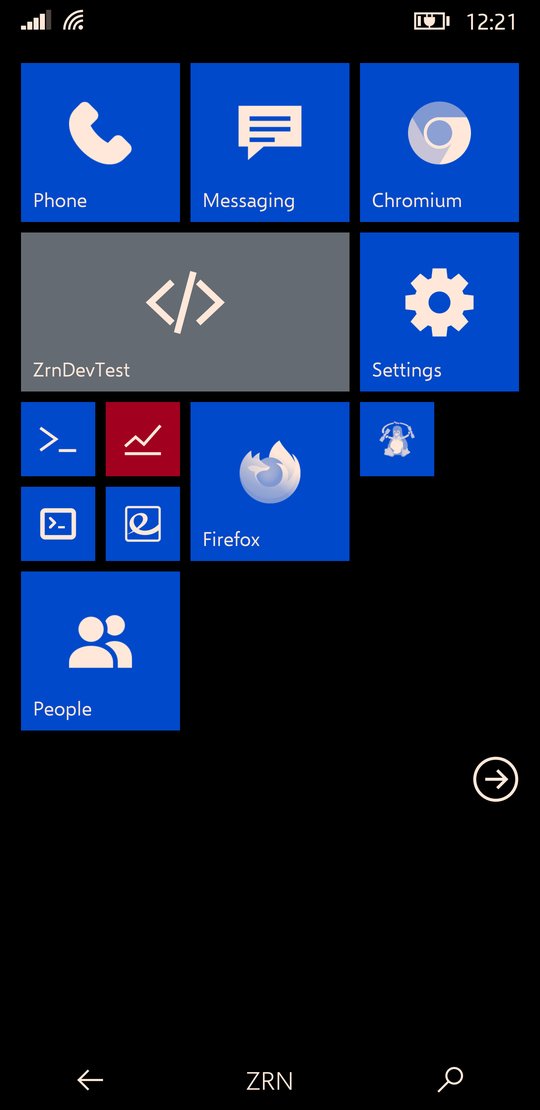
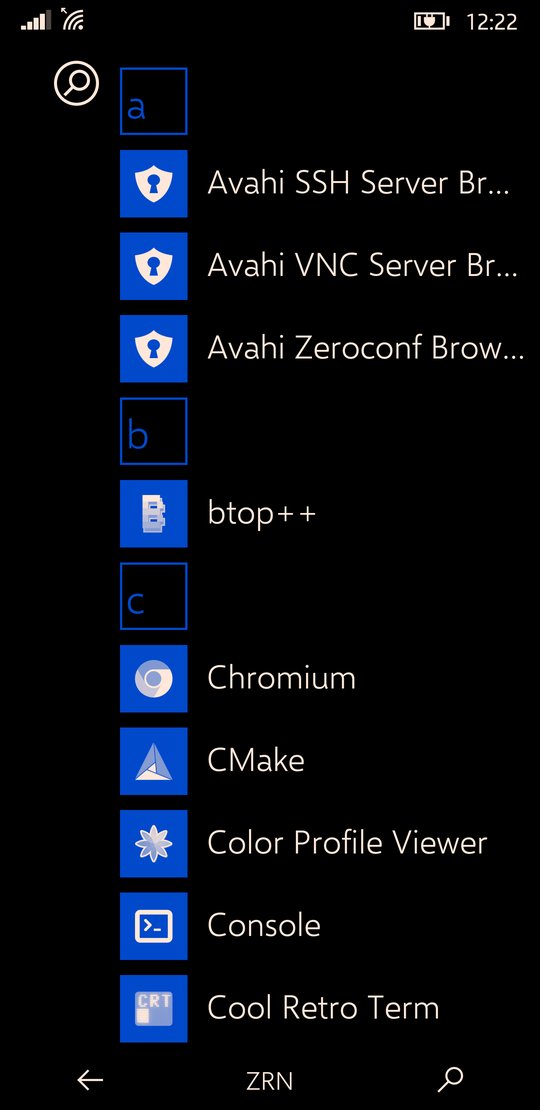
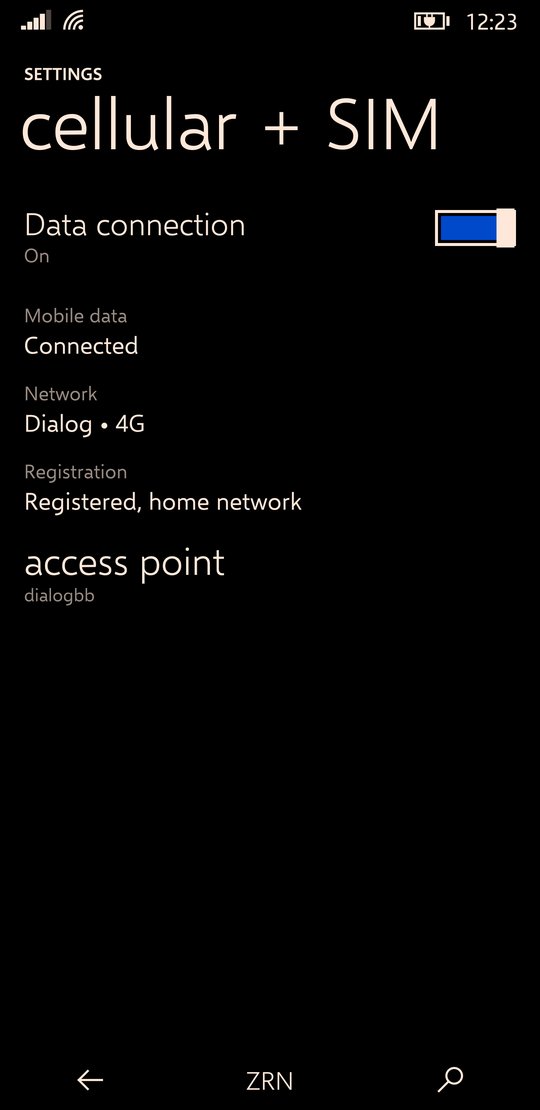
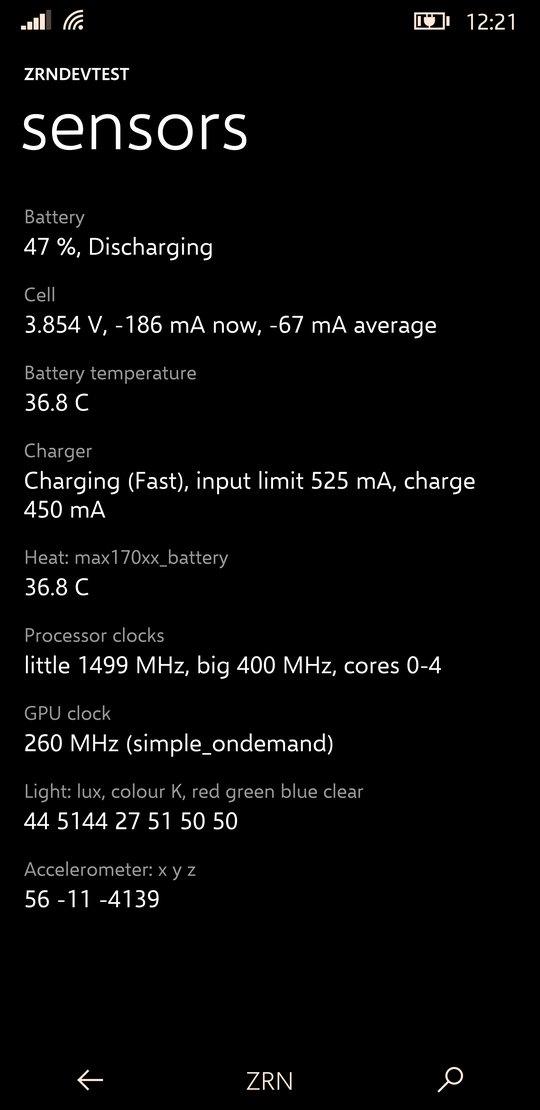
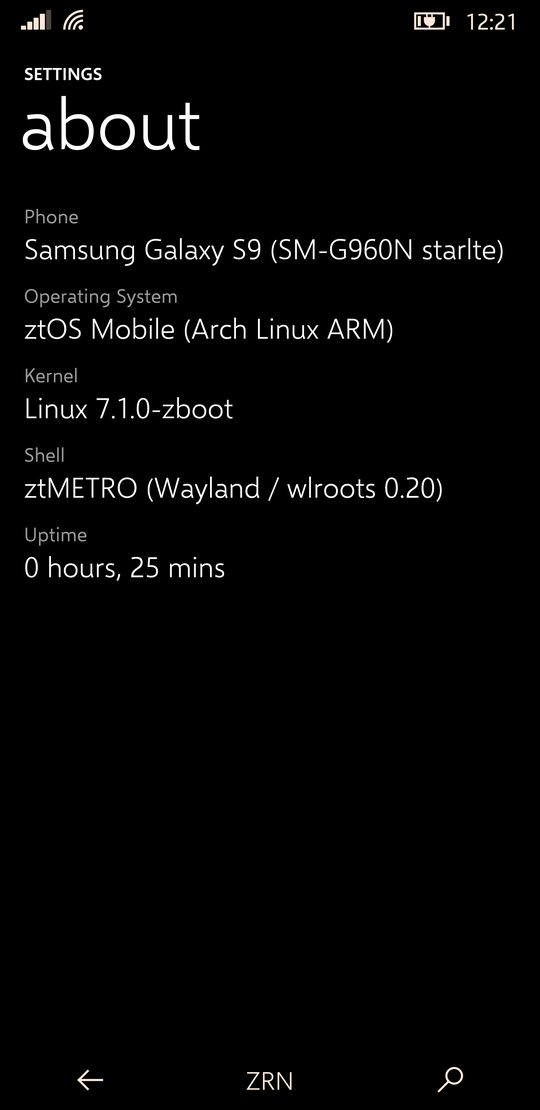

ztMETRO is a Wayland compositor, built on wlroots, that is also the whole phone interface: Start with its live tiles, the app list and search, the action centre, the app switcher, the lock screen and the on-screen keyboard. Its look and motion are Windows Phone 8.1's, measured frame by frame against screen recordings of real Lumias.
It renders itself with OpenGL ES: every tile, bar and app surface is a textured quad with its own matrix, which is what lets tiles tilt under a finger and whole screens swing. Text is drawn once and kept as a texture, and frames are drawn only while something moves.
- Start and tiles
- Pin, move and resize tiles; the turnstile when an app opens and when you come back.
- Action centre
- Notifications, quick actions, brightness, and a media banner.
- Keyboard
- On-screen, lifting the app so the text box stays in sight.
- Animation speed
- One setting for the whole interface, shell and apps, 75% by default.
- Haptics
- Strength per kind of touch, set in Settings.
- Other apps
- Firefox, Chromium and any Linux app run as windows inside it.
Apps
What comes installed.
| App | What it does | Written with |
|---|---|---|
| Settings | Wi-Fi, cellular and SIM, haptics, quick actions, theme, developer options | ZrnMetroCore (C) |
| Phone, Messaging, People | Calls, SMS and contacts, in the same style | ZrnMetroCore (C) |
| ZrnDevTest | What the hardware reports: system, sensors live, the journal and kernel log | ZrnMetroCore (C) |
| Welcome | The first-start tour: Start, getting around, your apps, making apps | ztOS SDK (Python) |
| Updates | Shows available updates and installs them | ztOS SDK (Python) |
| Firefox, Chromium, terminal | Ordinary Linux apps, shown as windows | Arch packages |
The native apps share ZrnMetroCore, a small toolkit with the shell's own widgets, page turns, pivots and press tilt.
The SDK
Make apps in C, C++, Rust or Python.
The new SDK is zrn-sdk: one small GPU toolkit, libzrnui, under all four languages, in Metro or DotMatrix, whichever the system is set to. Apps ship as one signed .zexec file, and the store builds them from your source. It runs on a computer today and has not yet run on a phone.
zrn new "Notes" --lang c  # or cpp, rust, python
cd notes && zrn build
zrn render out.png        # see it with no phone, no display
The wiki at sdk.ztos.online covers every way to make an app, every UI element with real renders and code in each language, every animation running live with its real numbers (swivel, turnstile, fade, tilt), publishing to the store, and what is still missing.
The older Python SDK
The ztOS SDK builds an app into a single file: a small C launcher with the app's Python code, pages, pictures and the ztos runtime zipped behind it. Pages, lists, pivots, entries, toggles, round buttons, app bars and dialogs all come from the runtime, with the toolkit's own numbers for every motion.
ztos-sdk new "Notes"     # a new app, from the template
ztos-sdk run             # try it on the computer
ztos-sdk deploy          # build, install on the phone, open it
ztos-sdk logs -f         # what it prints, on the phone
Keeping it fast
- Motion on the GPU. While a page turns, a list scrolls or a button leans, a GPU layer over the app shows pictures of the pages as textured quads, drawn by a small C renderer. Widgets are rasterised once, not every frame.
- A warm runtime.
ztos-zygoteloads Qt for Python once and forks each app from itself, which saves about a second of CPU per launch. - Compiled code. Apps ship with their Python already compiled, so the phone never compiles it on start.
System services
ztOS's parts below the shell.
| Name | What it does |
|---|---|
| ztOSCoreSensorFramework | Starts and watches every piece of hardware support and reports what fails; runs the sensor hub and the sensors |
| ztOSCoreNetworking | The modem, calls, messages and mobile data, and joining Wi-Fi |
| ztOSCirrusAudio | Sound: the audio DSP and the Cirrus speaker amplifiers |
| zrnperfd | Power: dynamic boost from the efficiency cores up, and core power-down |
| ztos-iald | ztOSIAL: serves the phone's hardware to the rest of ztOS over D-Bus, the same on every phone |
| Waydroid | Android apps, in a stripped-down Android 13 fetched and set up on first boot |
| ztos-update | The updater: a daily check, a notification, and the Updates app |
GSI and ztOSIAL
How ztOS is put together since BETA-1.
ztOS is built as one generic system image (GSI) for every aarch64 phone: the shell, the apps, the services and Waydroid, with no kernel, no user and nothing specific to a phone. Each phone adds a device layer: its kernel, firmware, drivers, and a manifest saying how its hardware is reached. The two meet at ztOSIAL, the Zerone Technologies Operating System Interface Abstraction Layer: a set of D-Bus interfaces (org.ztos.ial) served by ztos-iald.
- Interfaces
- 13: device, power, performance, display, sleep, sensors, haptics, lights, modem, call audio, audio devices, acceleration and Android.
- Backends
- Each interface is served by a generic backend (enough on a phone with full mainline support), the generic one with parameters, a Python backend in the device layer, or a separate service.
- Device layer
/vendor/ztos/manifest.tomland what it names. Porting a phone means writing this, not changing ztOS.- Kernel contract
- The GSI lists the kernel options it needs; ztConflo checks a phone's kernel against it before building.
- Checking a port
ztos-ial statusandztos-ial teston the phone show what works.
| Repository | What it holds |
|---|---|
| ztos-core | ztMETRO, the apps, the SDK, Android support and the system files in the GSI |
| ztos-ial | The interfaces, ztos-iald, the command line and the C and Python clients; the porting guide |
| ztos-build | The installer: ztos build --target gsi builds the GSI |
| ztos-device-samsung-starlte | The Galaxy S9's device layer, and the example for new ones |
| ztos-devices | ztConflo's registry of phones |
| ztOS | Everything in one tree, as before the split |
Device list
Phones ztOS runs on: ported by people, or built by ztConflo.
Every phone has its own page on devices.ztos.online: what works, its specifications, and a step-by-step installation guide with every command to type. Phones are sorted by maker, and you can search them.
Community Ports
Ported, installed and checked on the phone itself, and reviewed by moderators.
Loading the phones…
Cross-Ports EXPERIMENTAL
Phones ztConflo can build ztOS for, from postmarketOS's ports on mainline Linux. Most are untried; the list updates itself every day.
Loading the phones…
ztConflo: other phones
How ztOS reaches more phones.
ztConflo takes a phone's codename and builds a flashable ztOS image for it: Arch Linux ARM with ztMETRO, on a kernel and boot setup that postmarketOS already boots. Given the GSI (--gsi), it adds a device layer generated for the phone and checks the phone's kernel against the GSI's kernel contract. It looks in the ztOS device registry first and falls back to postmarketOS for phones nobody has ported ztOS to yet. It never ports new hardware.
- Eligible phones
- 135 today, with a mainline aarch64 kernel; 71 of them archived by postmarketOS, and flagged.
- GPU check
- Phones without a Mesa GPU driver still build, with a warning that ztMETRO won't start.
- Registry
- One TOML file per phone; a phone moves from untested to boots to tested through a hardware checklist.
- Interface
- A command line and a terminal UI in ztOS's own look, which installs its tools on first run.
Status and next
Where ztOS is today.
- The first phone besides the S9 booting a ztConflo build from the GSI.
- Calls, messages and sensors in the apps through ztOSIAL, rather than the S9's own services.
- The sound of calls, and receiving SMS.
- Suspend on the S9, for idle battery life closer to Android's.
- Native apps drawing with OpenGL ES the way the shell does, and a ztOS package repository for updates.
See also
- ztOS source, with the full status page and the SDK guide, and its parts: ztos-core, ztos-ial, ztos-build and ztos-device-samsung-starlte
- ztConflo, the image builder, and ztos-devices, its registry
- galaxy-s9plus-mainline-linux, the Exynos 9810 mainline drivers ztOS builds on
- postmarketOS, whose kernels ztConflo reuses
- Ometh Abeyrathne, who makes ztOS